-
 GarminMM: Data interchange with a Garmin GPS
Direct access to online help: GarminMM
Access the application from the menu:
"File | Import | Vectors and/or databases | GPS -> PNT, ARC/NOD"
"Tools | GPS"
Presentation and options
This program loads and downloads objects (points and lines) from the models of GPS of the GARMIN range to MiraMon through the computer's serial and USB ports.
The objects that can be downloaded from the GPS to MiraMon format are:
- Waypoints: are converted into structured MiraMon points (PNT). In the associated database the points file is saved with a short, 6 character attribute, the original GPS latitude and longitude (before transformation of the datum and the projection), the Z (if the GPS can supply this), a longer descriptive field, the symbol code used and the display options of the GPS. The points file generated in this way has no topological structure.
- Tracks: are converted to a MiraMon arcs file (ARC) without topology. For each to the arcs the attribute of each, the GPS display options and color are saved in the database.
- Routes: waypoints forming routes are saved as structured points (PNT) and the code for the route that they belong to is saved in the associated database.
The objects that can be downloaded from MiraMon to the GPS are:
- Points (PNT) to Waypoints: It is necessary to choose a database field associated to the PNT to act as identifier. We suggest using the entity identifier if it exists, or else the graphical identifier.
- Lines (ARC) to Tracks: It is necessary to choose a database field associated to the ARC to act as identifier. We suggest using the entity identifier if it exists, or else the graphical identifier. It should be remembered that some GPS models do not allow different tracks to be identified.
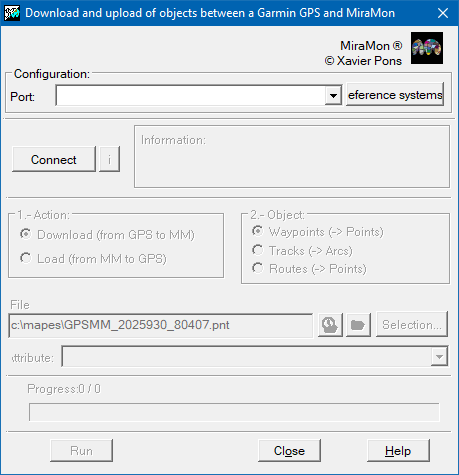
The following described the steps for loading and downloading information to and from the GPS: To communicate with the Garmin GPS the GPS communication options must be configured (System Menu, Interface) as GARMN/GARMN and Master. With this configuration the GPS is told to send data in the Garmin proprietary format and that the external application controls the communication.
- Choose, from GarminMM, the serial or USB port of the computer to which the GPS is connected.
- The GPS always sends the objects' coordinates in longitude/latitude and datum WGS84. The program allows these coordinates to be transformed to any other reference system supported by MiraMon including changing the datum with greater precision than usually used by the GPS receiver. The reference system for the cartography where the downloaded objects are to be represented must be selected (eg., in Catalonia UTM-31N UB/ICC).
- Once the GPS is connected to the computer port and switched on, the Connect button must be pressed. If the connection is good the program should tell us the GPS model and the software version.
- Once the communication has been established it is necessary to select an action, load or download objects, and the type of objects (waypoints, tracks or routes). Finally the user must give the name of the file where the objects are saved. The default is a name containing the date and the time.
Notes:
- If loading objects in the GPS, the select button allows us to select which objects in MiraMon format to transfer to the GPS. Before loading objects in the GPS the limitations of the receiver must be considered (number of points in the memory, only one six character attribute, etc).
- When the objects have been downloaded, the program offers the option to display with MiraMon. If selected MiraMon opens and automatically loads the selected vector file.
- If anything unexpected occurs during the transfer of objects, transfer stops immediately. The user may try to restart communication by pressing the Connect button again. If the communication is not reestablished try restarting the GPS.
- When loading objects from MiraMon to the GPS remember the limitations of the GPS. In many models the text that acts as identifiers in the GPS is limited to 6 plain characters (no accents, etc). The program automatically cuts and transforms the text in the database before loading in the GPS.
- When loading objects in the GPS, if there already exists an object with the same name this will be overwritten with the characteristics of the new object. Neither GarminMM nor the GPS advise the user if this happens.
- To give topological structure to the waypoints, routes or tracks, use the topology structuring tools of MiraMon.

Dialog box of the application
MiraMon is a program © of Xavier Pons.