-
 Rutes: Network analysis and determination of the optimal route
Direct access to online help: Rutes
Access the application from the menu: "Tools | Distance and network analysis | Network analysis (paths)"
Presentation and options
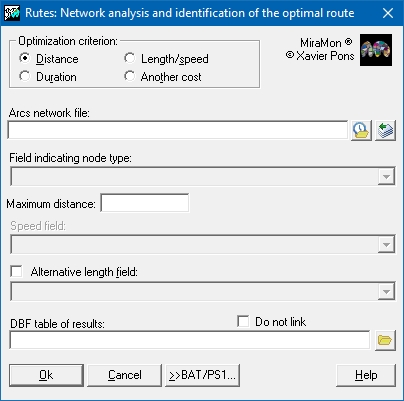
This program determines the optimal routes between a set of origin locations and a set of possible destination locations. The optimal route between a pair of origin-destination locations will be the one that minimizes the displacement to go from the origin to the destination, either in time, distance or by a numeric field defined by the user that represents any other variable that weighs the cost of the displacement. The program has several options:
The origin locations and the possible destination locations must be connected to the network that defines the set of possible routes. This means that they correspond to nodes of the arco/node topology of MiraMon. The type of location is determined by the values of a field in the node database (*N.dbf) that the user must create and fill in (if this information is in a point layer, it can be transferred to the node layer using the PNT->NOD mode of the AtriTop application). The accepted values in this field are:
- "O", for the origin nodes.
- "D", for destination nodes.
- "A", in both cases, that is, for the origin and destination nodes at the same time.
- "", blank for nodes that are not origin or destination.
On the other hand, the arcs determine the direct connections between nodes and in their database (*A.dbf) there must be fields that define the costs associated with each connection (for example, if you want to apply time optimization, a field that defines the speed in each section would be necessary). Regarding the distance, the topological field of ellipsoidal length will be used whenever it exists and the user does not specify an alternative field. If it did not exist, the topological field of planimetric length would be used (both are created by default when generating line-type vectors). If, on the contrary, the user provides an own field, it will be checked that the values ??are valid, that is, numerical and greater than zero. In case of invalid values, the program will stop its execution.
The resulting file is a table in DBF format that allows establishing a relationship between each source node and a destination node that optimizes its path (as long as there is at least one sequence of arcs that connects the source node with the destination node and its cumulative cost is lower than the maximum cost specified in the command line). It must be considered that the same destination node can be the end of several optimal routes or not at all.
The costs of each optimal route found are displayed on the screen and saved in the specified DBF table. The resulting values are expressed in the same units as the fields involved (for example, when a speed field is used in km/h the accumulated distances are given in km and the accumulated times in hours. To be able to perform the calculations correctly the fields involved should have the units described in the metadata and these must be recognized by MiraMon. In case of using units not recognized by MiraMon, the user must contact the programming.

Dialog box of the application
Syntax
Syntax:
- Rutes 1 ArcsFile DBResults Node-typeField MaximumDistance [/CAMP_LONG] [/NO_VINCULAR]
- Rutes 2 ArcsFile DBResults Node-typeField MaximumTime TimeField [/NO_VINCULAR]
- Rutes 3 ArcsFile DBResults Node-typeField MaximumDistance SpeedField [/CAMP_LONG] [/MAX_TEMPS] [/NO_VINCULAR]
- Rutes 4 ArcsFile DBResults Node-typeField MaximumCost CostField [/NO_VINCULAR]
Options:
- 1:
By minimum cumulative distance.
- 2:
For the shortest accumulated time.
- 3:
For the minimum accumulated time, each segment is obtained as the quotient of length and speed.
- 4:
For minimum accumulated cost, the cost is defined by the user via a field that measures the effort of movement.
Parameters:
- ArcsFile
(Arcs file -
Input parameter): It is the name of the structured arc file containing the path network.
- DBResults
(DB results -
Output parameter): It is the name of the DBF file that will establish the relationships between origin and destination nodes and store the accumulated distance and/or time values.
- Node-typeField
(Node-type field -
Input parameter): It is the alphanumeric field in the ArcsFile node file database that indicates whether a node is a start node (value "O"), an end node (value "D"), or both (value "A").
- MaximumDistance
(Maximum distance -
Input parameter): It represents the maximum threshold (in meters) for discarding routes that exceed this cumulative length.
- MaximumTime
(Maximum time -
Input parameter): It represents the maximum threshold (in the same time units as TimeField) used to discard routes that exceed this travel time,
- TimeField
(Time field -
Input parameter): It is the field in the ArcsFile database that contains the travel times associated with each arc. The values must be defined in seconds, minutes, or hours.
- SpeedField
(Speed field -
Input parameter): This is the field in the ArcsFile database containing the speeds associated with each arc, which are necessary to calculate the travel time for each route. The associated time units must be defined in seconds, minutes, or hours.
- MaximumCost
(Maximum cost -
Input parameter): It represents the maximum threshold for discarding routes that exceed this cost.
- CostField
(Cost field -
Input parameter): This is the ArcsFile database field that will be used to calculate the cost of each route. The field does not need to have an associated unit of measurement.
Modifiers:
/CAMP_LONG= (CAMP LONG) Specify the field in the FitxerArcs database that will contain the lengths of each arc, which will be used instead of the topological values ??present by default in the database. (Input parameter) /MAX_TEMPS=
(MAX_TEMPS)
If specified, it represents the maximum threshold (in the same time units as the SpeedField) used to discard routes that exceed this travel time. (Input parameter) /NO_VINCULAR= (NO_VINCULAR) This parameter eliminates the default behavior of linking the resulting DBF table to the database associated with the source node file. (Input parameter)