-
 Illum: Calculation of the illumination image from a Digital Elevation Model
Direct access to online help: Illum
Access the application from the menu:
"Tools | Terrain interpolation and analysis | Obtain Digital Illumination Model"
"Tools | Radiometry | Obtain Digital Illumination Model"
Presentation and options
This program calculates, from a Digital Elevation Model (DEM), the illumination received by a point in the terrain when the Sun occupies a certain position in the celestial sphere. This position can be defined:
- From the Sun elevation and azimuth, in degrees (for example 74.82 and 170.34); the Astres program will give this information if it is unknown, which are constant throughout the extent of the DEM. This corresponds to option 1 of the program.
- From the elevation values (or zenith angle) and solar azimuth in degrees or in multiple degree units (defined by the corresponding syntax) as calculated for MODIS products, for example MOD09 (for more information see the Surface Reflectance User's Guide). It is related to program options 2 and 3.
This program offers the following options:
Constant elevation and azimuth (neighbors):
Calculates illumination with constant solar elevation and azimuth and 4, 8 or 9 neighbors for the normal vector calculation.
Constant elevation and azimuth (trend surface):
Calculates illumination with constant solar elevation and azimuth and trend surface, autoadaptive or finite elements mode.
Elevation and azimuth as files (neighbors):
Calculates illumination from solar elevation and azimuth raster files and 4, 8 or 9 neighbors.
Elevation and azimuth as files (trend surface):
Calculates illumination from solar elevation and azimuth raster files and trend surface, autoadaptive or finite elements mode.
Zenith angles as file (neighbors):
Calculates illumination from zenith angle and solar azimuth raster files and 4, 8 or 9 neighbors.
Zenith angles as file (trend surface):
Calculates illumination from zenith angle and solar azimuth raster files and trend surface, autoadaptive or finite elements mode.
The output file contains values being the cosine of the angle of incidence, i.e., the cosine of the angle between the vector normal to the maximum slope plane and the solar vector (given by the solar azimuth and elevation). From the two possible angles (i<180º and i'>180º, i+i'=360º) the cosine of the smaller is given.
The DEM may have byte, (short) integer or real format, compressed or uncompressed. By default, the DEM extent and spatial resolution will be carried over to the illumination model output, but it can also be calculated at a finer scale and in that case the model will approximate a small surface of local tendency to the combined elevation pixels that contribute to each output pixel. The normal vector of this surface will provide the calculations related to solar position.
The output file is always in byte format and it contains values 'v' of the cosine of the incidence angle scaled as: v*100+100. This way, cosine values, that should be in the interval [-1,1], go to the interval [0,200]. This is suitable for byte format and takes in three significant figures for the cosine values, enough for most applications. So, an output value of 173 should be interpreted as a cosine value of 0.73, corresponding of an angle of incidence of 43º.
If the DEM has flag values and they are correctly documented, pixels that are affected by a flag value in the input DEM will get the value 255, documented as NoData in the output file. This will cause a little reduction of the useful area in the borders between flag and elevation values. This is due to the fact that flag values do not allow to perform a rigorous calculation of the illumination. A way to mitigate this problem is to iterate once the program FagoVal before executing ILLUM. This allows the enlargement the area with "reasonable" height values. In this execution use the flag value as the value to be eliminated and use the mean criterion to substitute this value.
The program allows for calculations taking 4 (up-down and left-right) or 8 (up-down, left-right and diagonals) nearest neighbors at each point. In the last case, the weight of the diagonal neighbors is smaller in proportion to the distance to the center of the point to evaluate.
If the DEM is a multiband raster with pixels of different size for each band, the /MULTIBANDA parameter must be used and a resulting multiband raster with the corresponding illumination models must be generated. It should be noted that with Option 1 solar position is considered unique for all bands. If the geographical extends were excessively separated between them a unique execution for all bands with the solar position at the center of the extend ought to be done. For the multiband case, it is possible to add a prefix to the original file names.

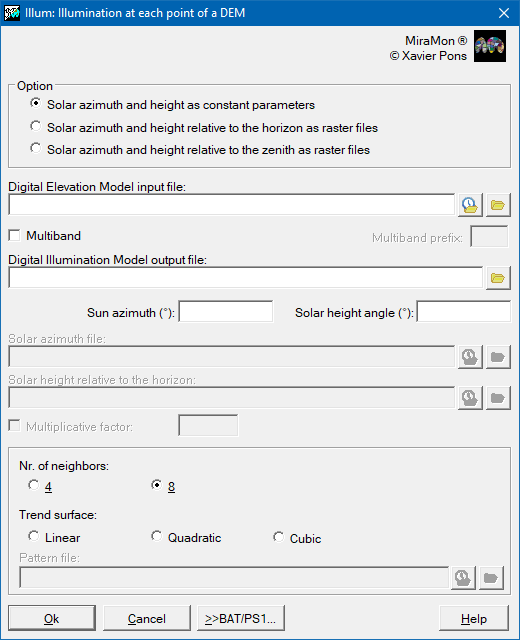
Dialog box of the application
Syntax
Syntax:
- Illum 1 DEMFile OutputFile SolarElev SolarAz N_neighb_or_degrees [/MULTIBANDA] [/PREFIX] [/VORA] [/FACTOR] [/N_MODELS_INTRACEL] [/N_REP_AUTOADAP] [/ALEAT_DIF] [/INCR_PT_AJ] [/TIPUS_RASTER]
- Illum 1 DEMFile OutputFile SolarElev SolarAz N_neighb_or_degrees Reference [/MULTIBANDA] [/PREFIX] [/VORA] [/FACTOR] [/N_MODELS_INTRACEL] [/N_REP_AUTOADAP] [/ALEAT_DIF] [/INCR_PT_AJ] [/TIPUS_RASTER]
- Illum 2 DEMFile OutputFile SolarElev SolarAz N_neighb_or_degrees [/MULTIBANDA] [/PREFIX] [/VORA] [/FACTOR] [/N_MODELS_INTRACEL] [/N_REP_AUTOADAP] [/ALEAT_DIF] [/INCR_PT_AJ] [/TIPUS_RASTER]
- Illum 2 DEMFile OutputFile SolarElev SolarAz N_neighb_or_degrees Reference [/MULTIBANDA] [/PREFIX] [/VORA] [/FACTOR] [/N_MODELS_INTRACEL] [/N_REP_AUTOADAP] [/ALEAT_DIF] [/INCR_PT_AJ] [/TIPUS_RASTER]
- Illum 3 DEMFile OutputFile SolarElev SolarAz N_neighb_or_degrees [/MULTIBANDA] [/PREFIX] [/VORA] [/FACTOR] [/N_MODELS_INTRACEL] [/N_REP_AUTOADAP] [/ALEAT_DIF] [/INCR_PT_AJ] [/TIPUS_RASTER]
- Illum 3 DEMFile OutputFile SolarElev SolarAz N_neighb_or_degrees Reference [/MULTIBANDA] [/PREFIX] [/VORA] [/FACTOR] [/N_MODELS_INTRACEL] [/N_REP_AUTOADAP] [/ALEAT_DIF] [/INCR_PT_AJ] [/TIPUS_RASTER]
Options:
- 1:
Elevation and azimuth are constant parameters for the file extent.
- 1:
Elevation and azimuth are constant parameters for the file extent.
- 2:
Elevation and azimuth are raster files.
- 2:
Elevation and azimuth are raster files.
- 3:
Variation of Option 2, where a file of relative solar angles with respect to zenith is specified instead of a file with respect to the horizon (elevation). The zenith angle and the elevation angle are complimentary.
- 3:
Variation of Option 2, where a file of relative solar angles with respect to zenith is specified instead of a file with respect to the horizon (elevation). The zenith angle and the elevation angle are complimentary.
Parameters:
- DEMFile
(Digital Elevation Model -
Input parameter): Digital Elevation model in the raster format IMG. It may also be a text file listing a set of raster IMG files when using trend surface options.
- OutputFile
(Output IMG -
Output parameter): Output illumination file in the raster format IMG.
- SolarElev
(Solar elevation -
Input parameter): Value or file which determines the solar elevation (except for Option 3 which uses the zenith angle). If a file is used, it must be a raster file type IMG but not necessarily of the same resolution as the output illumination model.
- SolarAz
(Solar azimuth -
Input parameter): Value or file which determines the solar azimuth. If a file is used, it must be a raster file type IMG but not necessarily of the same resolution as the output illumination model.
- N_neighb_or_degrees
(N_neighb_or_degrees -
Input parameter):
- 4: 4 neighbors will be used for the calculation of the normal vector at each point. With this option, the generated illumination model output will be the same resolution and extent as the DEM.
- 8: 8 neighbors will be used for the calculation of the normal vector at each point. Output conditions are the same as with the 4 neighbor option.
- 9: The 8 neighbors plus the central cell (9 values) will be used to fit a plane (1st degree polynomial) for the calculation of the normal vector at each point; at least 3 of the 9 values are required. Output conditions are the same as with the 4 neighbor option.
- 1: A surface of local tendency of the 1st degree will be defined for each calculation of the normal vector at each point. In this option, the DEM has a greater spatial resolution (smaller pixel size) than the generated illumination model, which inherits the extent and the pixel size of the Reference file.
- 2: A surface of local tendency of the 2nd degree will be defined for each calculation of the normal vector at each point. Output conditions are the same as with Option 1.
- 3: A surface of local tendency of the 3rd degree will be defined for each calculation of the normal vector at each point. Output conditions are the same as with Option 1.
- A or a: Autoadaptive mode. For each cell of the illumination model, the best local trend surface (1st, 2nd or 3rd degree) is chosen from the higher resolution DEM cells inside it. Output conditions are the same as with Option 1.
- F or f: Finite elements mode. A plane (1st degree polynomial) is fitted to each group of 4 contiguous cells of the higher resolution DEM, provided at least 3 of the 4 cells have a value, and each cell of the illumination model is assigned the mean of the illuminations calculated inside it. Output conditions are the same as with Option 1.
- Reference
(Reference -
Input parameter): Obligatory parameter for options 1, 2, 3, A and F of N_neighb_or_degrees, which indicates the raster reference file that defines the extent and pixel size of the output illumination model.
Modifiers:
/MULTIBANDA (MULTIBANDA) If the DEM is multiband (normally of similar extent and different pixel sizes between bands), this parameter indicates that the desired output illumination model will also be multiband. (Input parameter) /PREFIX= (Prefix) Defines a prefix to be affixed to the original file names in order to determine the names of the corrected files in the /MULTIBANDA case. By default this prefix is i_. The program only reads /PREFIX= when /MULTIBANDA is also specified; without /MULTIBANDA, /PREFIX= is left as an extra parameter and the command line is incorrect. (Input parameter) /VORA= (VORA) Edge treatment of the raster in 4, 8 and 9 neighbor modes. Values: TEND (default) or IDEM. (Input parameter) /FACTOR= (Factor) Indicates the multiplicative factor for the unit values of the elevation and azimuth files to degrees. For example, for a raster where the units are decimal degrees, it is necessary to define /FACTOR=0.01. This parameter is optional (by default the factor is set to 1) and only is applicable to the principal options 2 and 3. (Input parameter) /N_MODELS_INTRACEL= (N_MODELS_INTRACEL) Number of incidence angle models per cell in trend surface modes (must be a perfect square). (Input parameter) /N_REP_AUTOADAP= (N_REP_AUTOADAP) Number of repetitions in autoadaptive mode to determine the best trend surface [1,100]. (Input parameter) /ALEAT_DIF (ALEAT_DIF) Enables a different random series in autoadaptive mode (by default the series is reproducible). (Input parameter) /INCR_PT_AJ= (INCR_PT_AJ) Increment factor for the number of adjustment points in trend surface modes [1,100]; default 2. (Input parameter) /TIPUS_RASTER= (TIPUS_RASTER) Output file data type: 1 (byte, default) or 4 (real). (Input parameter)